Introduction
Picture this: you are calling a private seller about a used car listing, and the last thing you want is a stranger saving your number before you trust them. So you type *67 before dialing.
But does star 67 still work in 2026, or has the gap grown between a 1990s dial code and today's call analytics, spam filters, and VoIP networks? The short answer is yes — with important conditions attached.
This guide explains how *67 actually functions at the network level, pinpoints every scenario where it breaks down, and shows what to use when per-call blocking is not enough.
- How *67 works at the carrier network level — not just on your device
- The honest 2026 status: yes it works, but with three growing limitations
- Four specific scenarios where *67 fails every single time
- Step-by-step instructions for iPhone and Android users
- Smarter alternatives including permanent blocks, second numbers, and VoIP
- Why businesses cannot rely on *67 and what to use instead
- Seven FAQ answers to the most searched *67 questions
What Is *67 and How Does It Actually Work?
*67 is a Vertical Service Code (VSC) — a short dial string that triggers a specific feature inside your carrier's switching system.
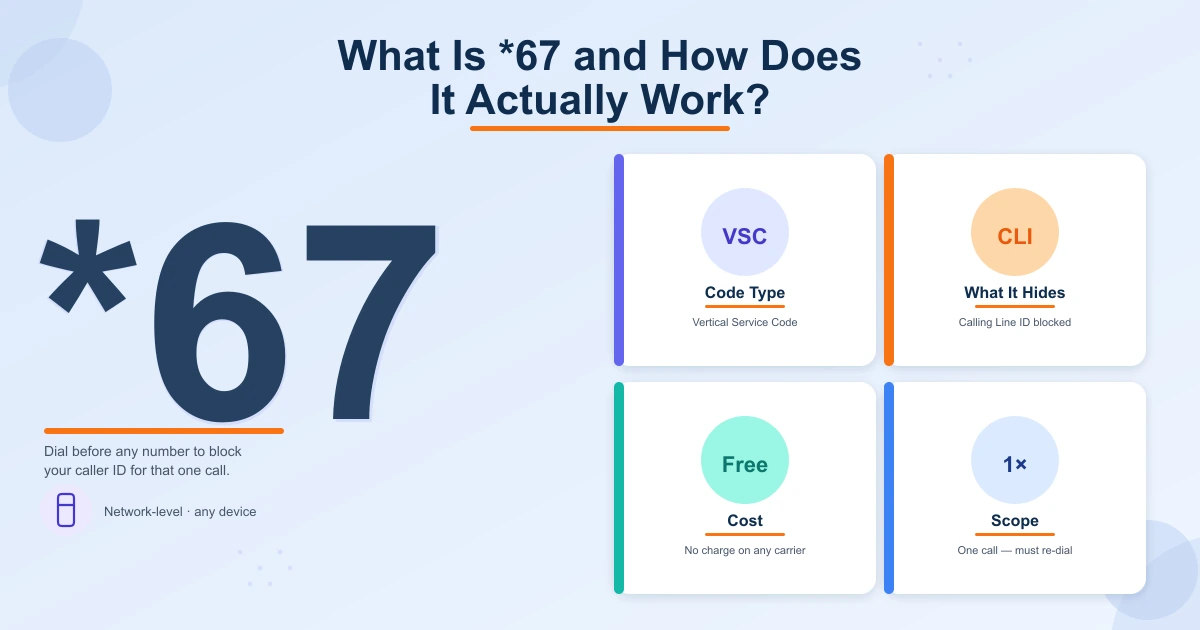
When you place a call with *67 first, your carrier suppresses your Calling Line Identification (CLI) before routing the call onward.
The result: the recipient sees "Private Number," "No Caller ID," or "Blocked" instead of your digits.
This is not a phone setting — it is a network-level instruction that works on any device connected to a supported carrier: smartphone, landline, or VoIP handset.
The code dates to the 1990s, when the FCC required carriers to offer free per-call caller ID blocking. The mechanism has barely changed since.
- Blocks caller ID for that one call only — must be re-dialed every time
- Works on mobile, landline, and most VoIP phones
- Costs nothing extra on virtually every North American calling plan
- Processed by the carrier network — not by your phone's software
Does Star 67 Still Work in 2026? The Honest Answer
Yes. For a standard call from one mobile or residential phone to another, *67 still works in 2026. AT&T, Verizon, and T-Mobile continue to honor the *67 VSC. The recipient typically sees "No Caller ID" or "Private Number," exactly as designed.
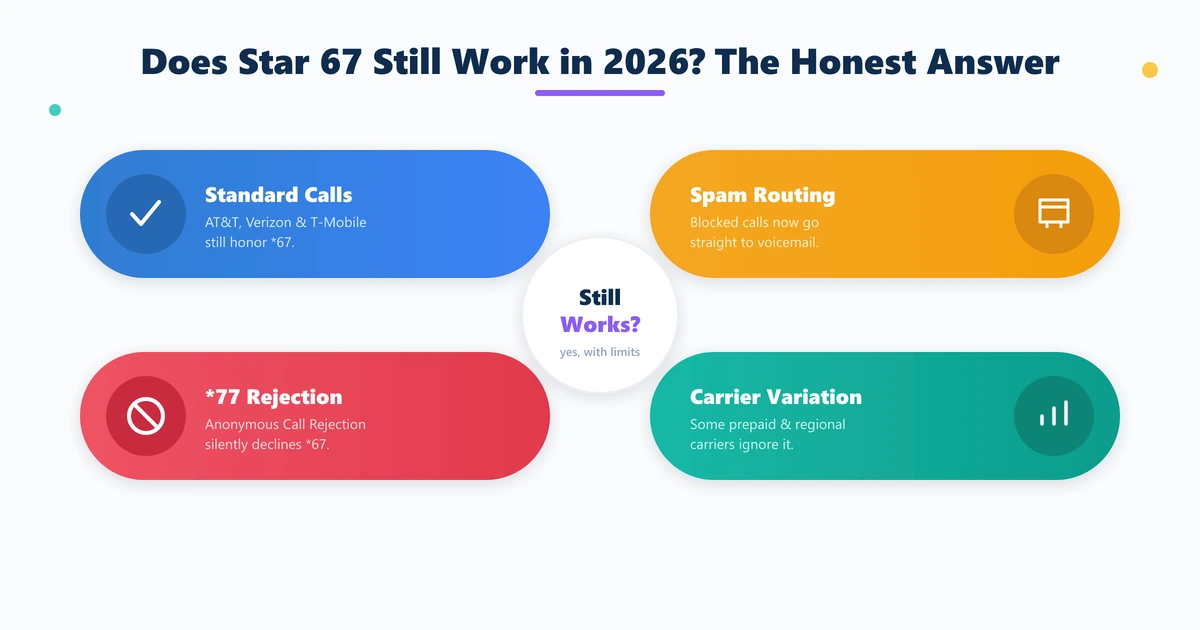
But "working" is not the same as "reliable in every situation." Three developments have reduced *67's practical effectiveness over the past decade.
Spam filter defaults. Google Phone on Android and Apple's built-in spam detection now treat blocked-number calls with heightened suspicion.
Many users have their phones configured — often by default — to send all "Unknown" calls directly to voicemail without ringing.
Anonymous Call Rejection (ACR). Most carriers allow recipients to activate ACR by dialing *77. Once enabled, any call arriving with caller ID suppressed is automatically declined before it ever rings.
Carrier variation. A small number of prepaid, regional, or international carriers do not fully honor *67, causing your number to display anyway.
- AT&T, Verizon, T-Mobile all honor *67 on standard calls
- Google Phone and iOS spam detection routes blocked calls to voicemail
- Anonymous Call Rejection (*77) silently declines all *67 calls
- Prepaid and regional carriers may not fully support the VSC
Four Times *67 Will Fail You (and Why)
Even when *67 is transmitted correctly, these four scenarios defeat it every time.
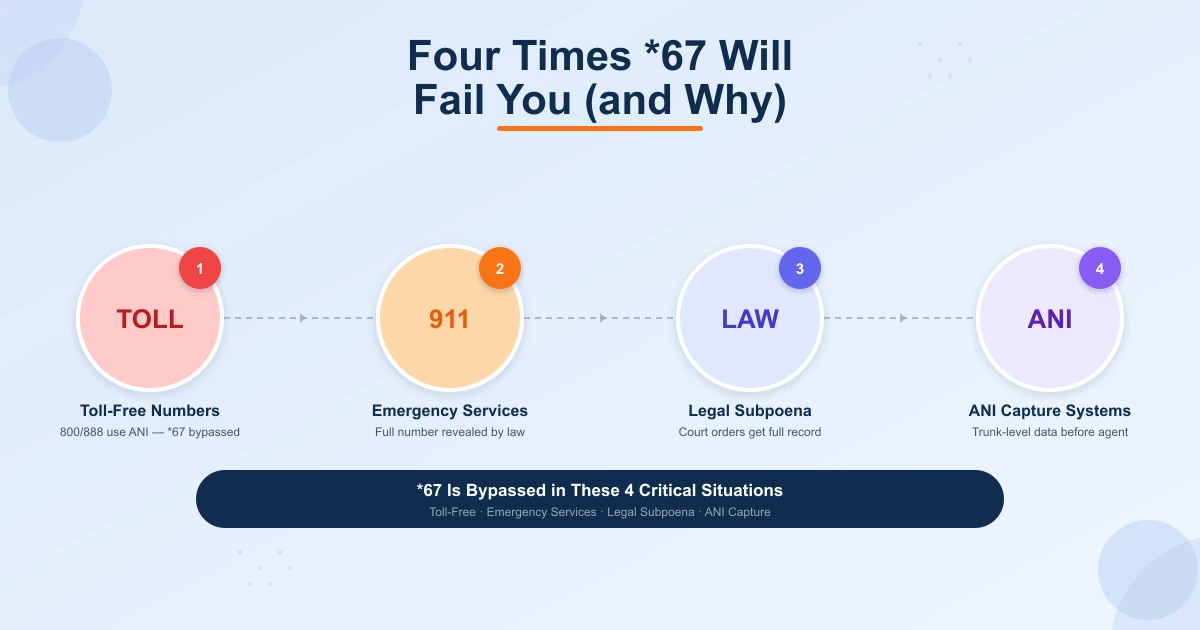
Toll-free numbers (800, 888, 877, 866, 855, 844, 833). Toll-free lines receive Automatic Number Identification (ANI) — a billing record at the carrier infrastructure layer that sits entirely outside the CLI system *67 affects.
The FCC explicitly exempts ANI from per-call blocking. The business sees your full number regardless of *67.
Emergency services (911). *67 cannot block your number from 911 dispatch. This is intentional and legally mandated — emergency networks must receive full caller location so dispatchers can locate you if the call drops.
Law enforcement with a legal subpoena. Your carrier logs every call including your full originating number, whether you dialed *67 or not. A court order compels full disclosure.
Business contact centers with ANI-capture systems. Modern platforms record trunk-level call data before it reaches the agent's screen. ANI capture is legal and widely used for callback, fraud detection, and CRM purposes.
- Toll-free (800/888/877) — ANI bypasses CLI suppression by FCC exemption
- 911 / Emergency — legally required to receive full caller identification
- Law enforcement — carrier records survive *67 and are subpoena-accessible
- Contact centers — trunk-level ANI capture logs your number before the agent sees the call
Step-by-Step: Using *67 on iPhone and Android
Using *67 requires no app, no settings change, and no carrier add-on. The steps are identical on every device.
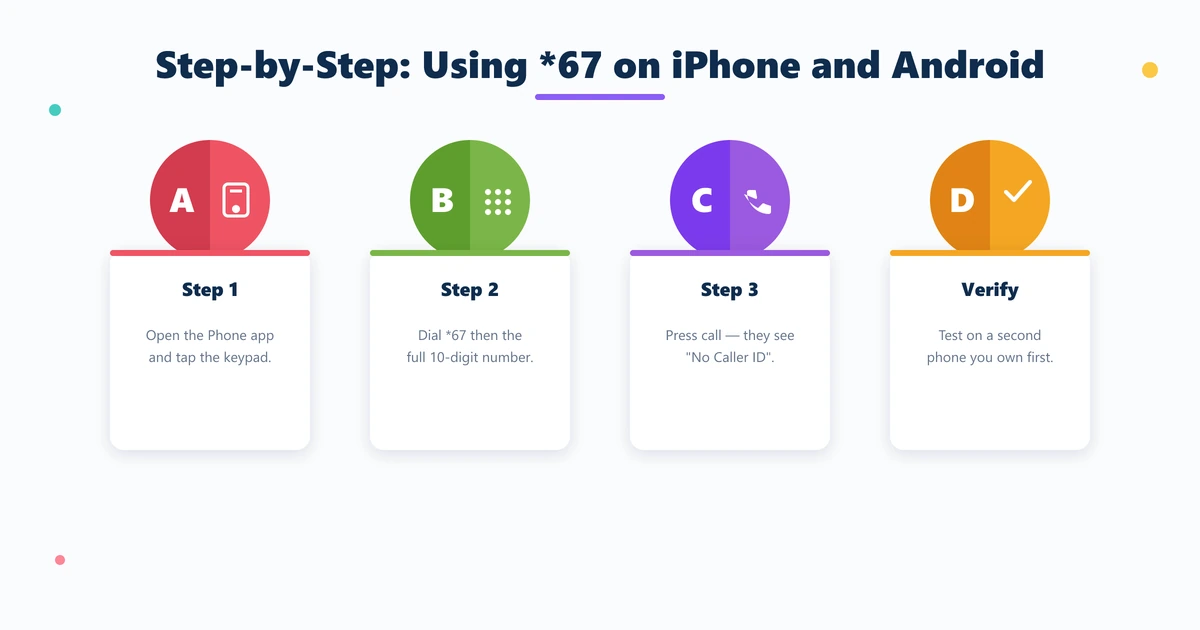
On iPhone: Open the Phone app and tap Keypad. Dial *67 immediately followed by the full 10-digit number — no spaces (example: *6715558675309).
Tap the green call button. No confirmation tone plays; the call connects normally while the recipient sees "No Caller ID."
On Android: Open your Phone or Dialer app and go to the keypad. Type *67 directly followed by the complete 10-digit number (example: *6715558675309).
Tap Call. Because *67 is processed by the network — not the phone's software — it works the same on Samsung, Pixel, OnePlus, or any Android handset.
Verify it before you need it. Call a second phone you own to confirm their screen shows "Private Number." This confirms your carrier honors the VSC.
For a permanent block on every outgoing call, go to Settings → Phone → Show My Caller ID (iPhone) or Phone app → Settings → Calls → Caller ID (Android) and disable the display.
- Step 1 — Open your Phone app and tap the keypad
- Step 2 — Dial *67 immediately followed by the full 10-digit number
- Step 3 — Press Call — recipient sees "Private Number" or "No Caller ID"
- Verify — test with a second device you own before relying on it
- Permanent option — disable Show My Caller ID in phone settings
Smarter Alternatives When *67 Is Not Enough
For anyone who needs privacy beyond an occasional call, *67's single-call scope creates real friction. These alternatives offer more control.
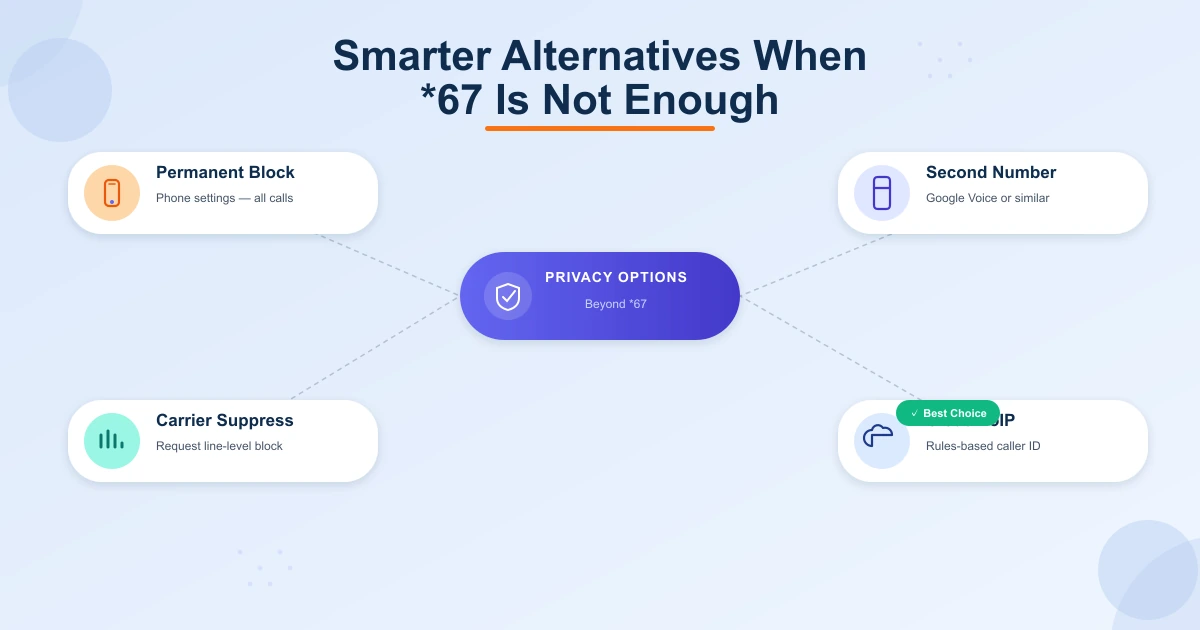
Permanent phone-level block. Both iOS and Android let you suppress outgoing caller ID in settings, applying the block to every call automatically.
Second number apps. Google Voice (free, U.S.) and similar apps give you a separate number for calls and texts. Your real number never appears — widely used for classifieds listings and freelance client work.
Prepaid SIM or secondary device. A separate prepaid SIM gives you a fully independent line with no connection to your primary identity.
Carrier-level permanent suppression. Call your carrier and request permanent outgoing caller ID block on the line. Most major U.S. carriers provide this free of charge.
Cloud VoIP with configurable outbound caller ID. Business-grade platforms allow rules-based control over which number appears on every call — by department, campaign, or agent.
- Permanent phone block — iOS/Android settings suppress ID on every outgoing call
- Google Voice — free second number for calls and texts in the US
- Prepaid SIM — fully independent line with no link to your primary identity
- Carrier suppression — request a permanent line-level block from your carrier
- Cloud VoIP — rules-based caller ID control across every call and agent
“*67 still functions as designed — but 'designed' assumed a world before spam scoring engines and carrier-sold call rejection services.”
Why Businesses Cannot Rely on *67 for Caller ID Control
For personal, occasional use, *67 is a reasonable tool. For teams making outbound calls at any volume, it fails immediately.
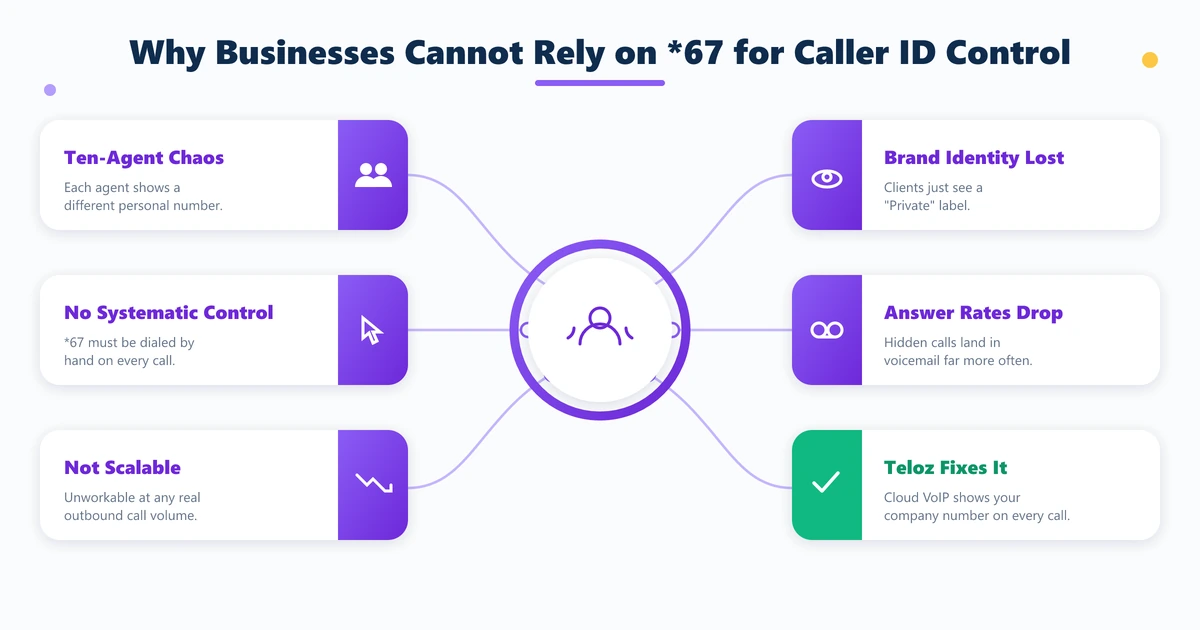
Consider a sales team with ten remote agents, each calling from a personal mobile line. Without a systematic solution, customers see ten different personal numbers or a "Private" label — neither builds trust.
Relying on every agent to remember *67 before each call is an operational non-starter.
The real alternative is cloud-hosted VoIP with native caller ID management. Teloz builds outbound caller ID configuration directly into its contact center platform.
Any outbound call — regardless of which agent places it or where they work — can present the company's main number, a local market line, or a specific department number. No manual *67.
No personal number accidentally reaching a client. Discover how Teloz structures outbound caller ID for distributed teams.
- 10-agent problem — each agent shows a different personal or private number
- No systematic control — *67 must be manually dialed on every single call
- Brand identity lost — clients see "Private" instead of your company number
- Answer rate drops — unknown and private calls go to voicemail far more often
- Teloz solution — cloud VoIP presents your company number on every outbound call
Conclusion
Does star 67 still work in 2026? For occasional privacy on standard calls, yes.
But its gaps have grown: toll-free ANI bypasses it, ACR rejects it, spam filters route it to voicemail, and carrier logs preserve your number regardless. Understanding these limits lets you use *67 wisely.
For businesses, the right tool is cloud VoIP with native outbound caller ID management — built at the network layer, not the keypad. Learn how Teloz delivers consistent caller ID control for outbound teams.


